A shared inbox for support teams: one team chat inbox for every channel
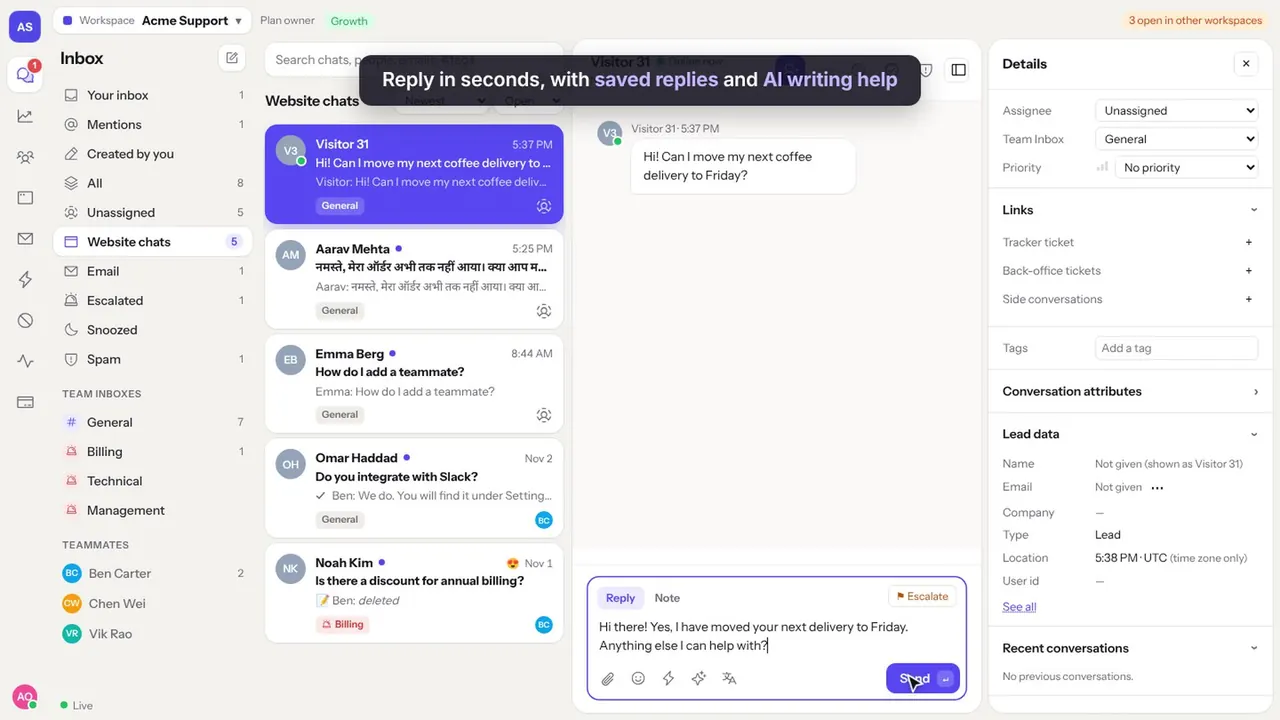
Your team answers customers on the website, by email and on WhatsApp. Huddle gives them one shared inbox to assign, reply, escalate and report, so nothing slips and nobody answers twice.
The problem
When support lives in a shared email password and a few personal phones, chats get answered twice or not at all, and managers cannot see what is happening.
Without reports you cannot tell if customers are happy, or who needs help.
How a shared inbox works for support teams
From the first message to the rating, in four steps.
Every message in one list
Website chats, emails and WhatsApp messages arrive in one inbox, with views for your chats, unassigned, mentions and escalated.
Assign without clashes
The first person to reply is assigned. You can also assign by hand, and Huddle shows who is viewing or typing in a chat.
Work together
Leave internal notes, mention a teammate, escalate to a manager, and snooze chats until they need you.
Measure and improve
Customers rate each chat from 1 to 5. Reports show reply times, ratings and activity per person.
Example conversations
The kind of questions support teams answer in Huddle every day.
What support teams use most
Assignment
First reply assigns, or assign by hand. See who is viewing and replying.
Team inboxes
Split work into inboxes like Billing or Technical, with access per person.
Notes and mentions
Internal notes and @mentions inside the conversation.
Keyboard shortcuts
Ctrl+Enter to send, A to assign, M to mention, ? for the full list.
AI writing help
Make a reply clearer, friendlier or shorter, and translate both ways.
CSAT and reports
Ratings, reply times and conversation reports, exportable to CSV.
What it costs
A team of 10 pays $79 a month on Growth, about $7.90 per person. A team of 25 pays $199 on Scale, about $8 per person, with email and WhatsApp included.
See all plans on the pricing section. Prices are in US dollars.
Questions
What is a shared inbox?
A shared inbox is one list of customer messages that the whole team can see and answer, with each conversation assigned to one person so nothing is missed or answered twice.
How is Huddle priced for teams?
Each plan includes seats: 3 on Starter, 10 on Growth and 25 on Scale. Extra seats cost $7 to $10 each a month.
Can we measure customer satisfaction?
Yes. Customers rate each conversation from 1 to 5, and the CSAT report shows results by teammate and inbox.
Does it work on phones?
Yes. Huddle runs in the browser on computers and phones.
More ways teams use Huddle
Try Huddle with your team
Starter is $29 a month with 3 seats, Growth $79 with 10 seats, Scale $199 with 25 seats, and WhatsApp only $19 with 3 seats. Seats are included in the price, not charged one by one.